Search has changed a lot recently. Google now shows AI-generated answers at the top of many results pages. Tools like ChatGPT and Perplexity are sending traffic to websites directly. And the bar for what counts as “good content” has never been higher.
The good news is that the core principles of SEO haven’t changed. The sites that rank well (and get cited by AI tools) are the ones that create genuinely helpful content, earn trust, and give users a great experience.
Here are 15 SEO best practices to help you do exactly that.
| SEO Best Practices: Impact vs. Difficulty | ||
|---|---|---|
| Impact | Difficulty | |
| Build your online brand foundation | ⭐⭐⭐⭐ | ⭐⭐⭐ |
| Demonstrate credibility and trust with E-E-A-T signals | ⭐⭐⭐⭐ | ⭐⭐⭐ |
| Improve your site’s user experience | ⭐⭐⭐ | ⭐⭐ |
| Target topics with search and AI traffic potential | ⭐⭐⭐⭐ | ⭐ |
| Match content with search intent | ⭐⭐⭐⭐ | ⭐⭐ |
| Create AI-friendly content | ⭐⭐⭐⭐ | ⭐⭐ |
| Create click-worthy title tags and meta descriptions | ⭐⭐⭐ | ⭐⭐ |
| Use your target keyword in the right places | ⭐⭐⭐ | ⭐⭐ |
| Use a short and descriptive URL | ⭐⭐⭐ | ⭐ |
| Optimize images for SEO to get additional traffic | ⭐⭐⭐ | ⭐⭐ |
| Add internal links from other relevant pages | ⭐⭐⭐⭐ | ⭐⭐ |
| Cover everything searchers want to know | ⭐⭐⭐⭐⭐ | ⭐⭐⭐ |
| Get more backlinks to build authority | ⭐⭐⭐⭐⭐ | ⭐⭐⭐⭐⭐ |
| Get good scores to pass Core Web Vitals | ⭐⭐ | ⭐⭐⭐⭐ |
| Use HTTPS to secure your site | ⭐⭐ | ⭐ |
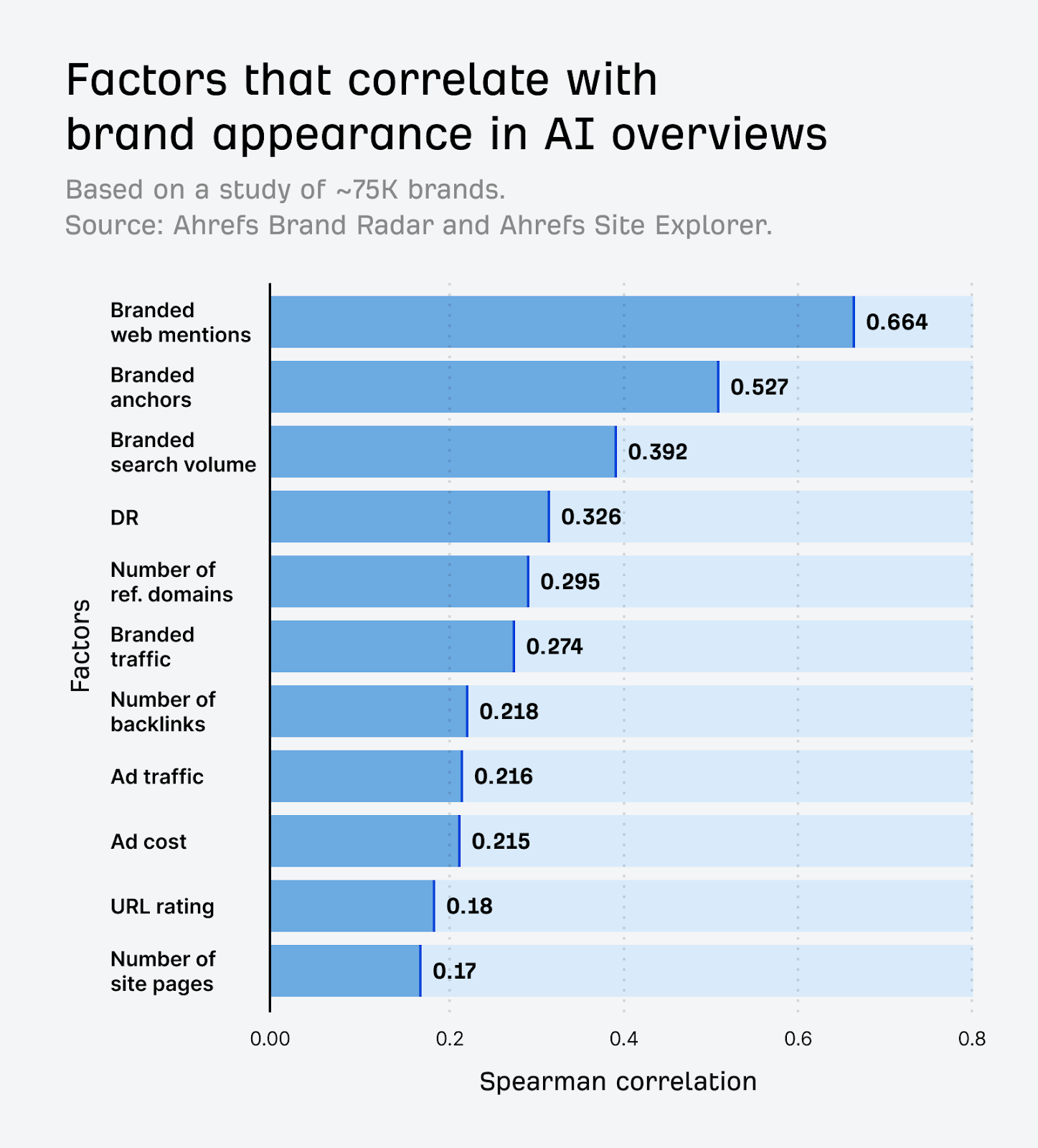
Google and AI tools increasingly favour brands they recognize. Brand signals such as branded search volume, web mentions, and anchor text directly correlate with visibility in both traditional search and AI Overviews.
When building your brand foundations online:
- Document how your brand should be referenced (name, capitalisation, a short elevator pitch)
- Create dedicated pages for each of your core products and services
- Keep your Google Business Profile complete and up to date
- Ensure your core business information is accurate on all business profiles and directories
It is easy for AI and search engines to misrepresent your brand if there is inconsistent, outdated, or incorrect information about you on the web. Start by tidying up these loose ends before you chase improvements in brand authority and visibility.
E-E-A-T stands for Experience, Expertise, Authoritativeness, and Trustworthiness, a framework Google uses to assess content quality.
It’s not a direct ranking factor you can switch on, but it shapes how Google’s algorithms and quality raters judge whether your content deserves to rank. Sites that demonstrably lack it have seen major traffic drops following core updates.
With AI-generated content flooding the web, genuine first-hand experience and real expertise have become stronger differentiators. Google and AI tools are more likely to surface content from sources they recognise as credible.
To strengthen your E-E-A-T signals:
- Add detailed author bios with credentials, experience, and links to published work
- Include original research, first-hand experience, or expert commentary that AI can’t replicate
- Show content has been reviewed by a subject matter expert where relevant
- Keep your About page, contact details, and editorial policies accurate and easy to find
- Collect and display reviews, testimonials, and third-party recognition
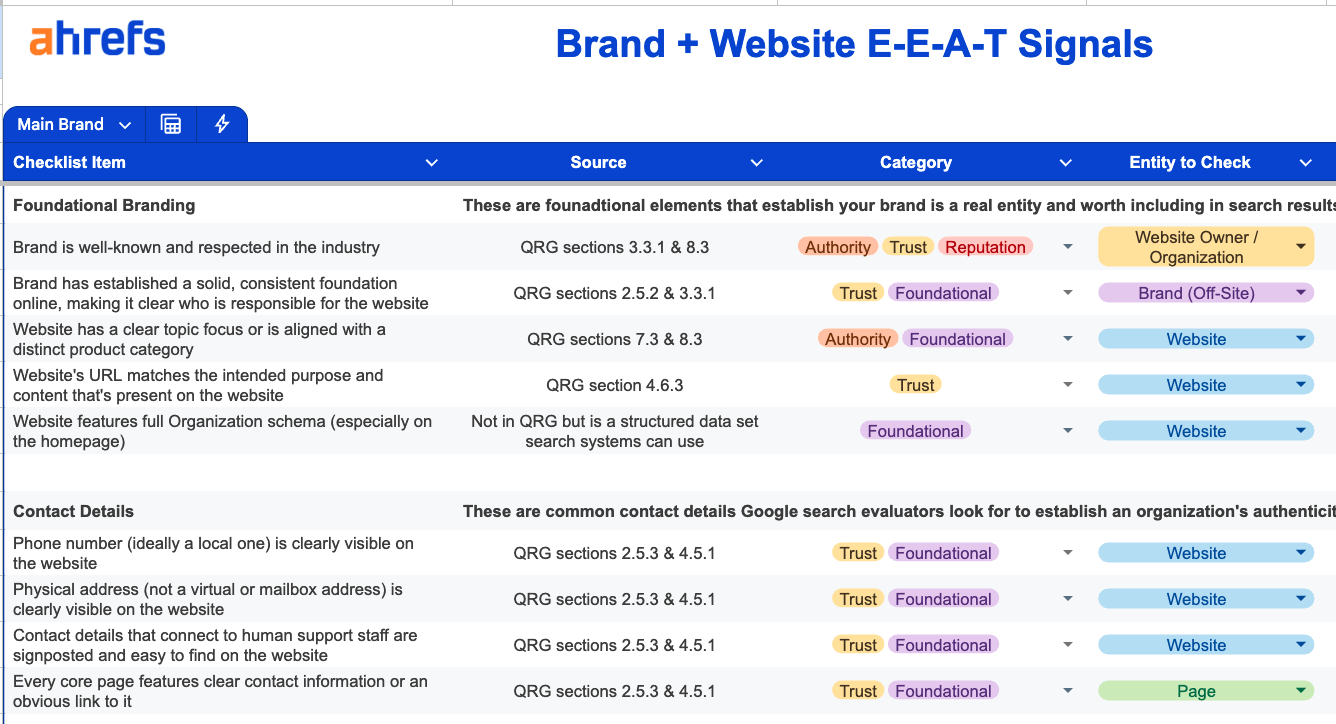
The best way to assess where you stand is to run an E-E-A-T audit across your brand, people, and pages — covering 220+ markers tied to Google’s Quality Rater Guidelines.
User experience (UX) focuses on your site’s usability and how visitors interact and experience it. Good UX goes beyond making your website look nice since it directly influences your SEO.
Internal Google documents confirmed during the 2023 DOJ antitrust trial that user interaction data is one of the three core pillars Google uses to rank content. Every click, scroll, and bounce back feeds into the machine learning models that shape future search results.
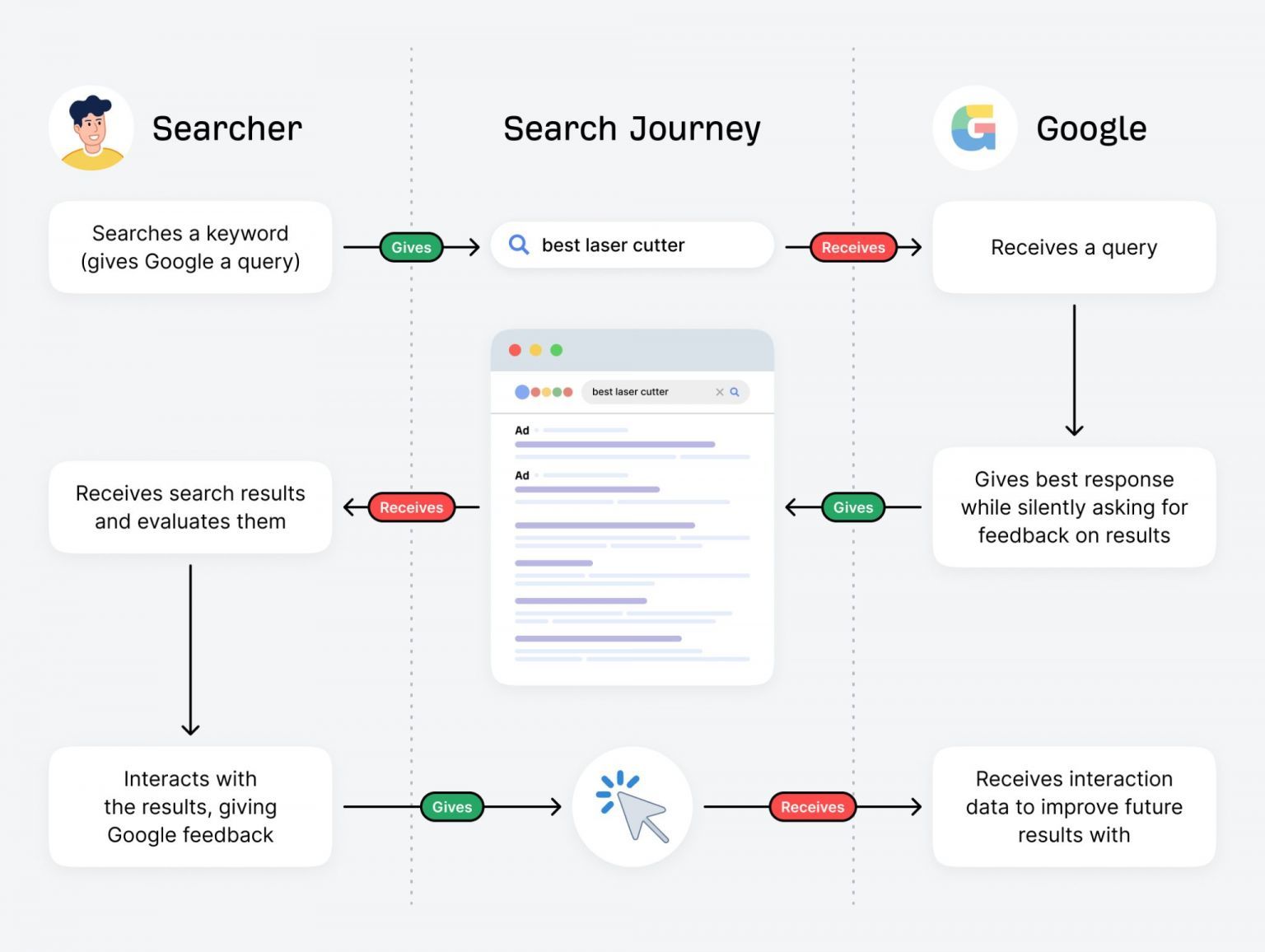
In short, if people consistently have a poor experience on your site, it will hurt your rankings and AI visibility over time.
To improve your UX and stop users from leaving your website quickly, try testing the following:
- Visual appeal – Can your website’s visual appeal be improved?
- Easy to navigate – Is the website’s structure well-designed and easy to navigate?
- Intrusive pop-ups – Are there any intrusive pop-ups that may harm the user experience?
- Too many ads – Are the ads distracting from the main content?
- Mobile friendly – Is your website easy to use on a mobile device?
Trying to rank for keywords nobody’s searching for is a fool’s errand. You won’t get traffic even if you rank number one.
For example, say you sell software tutorials. It won’t make sense to target “how do I make font larger in coffee cup html editor” because it has no search volume:
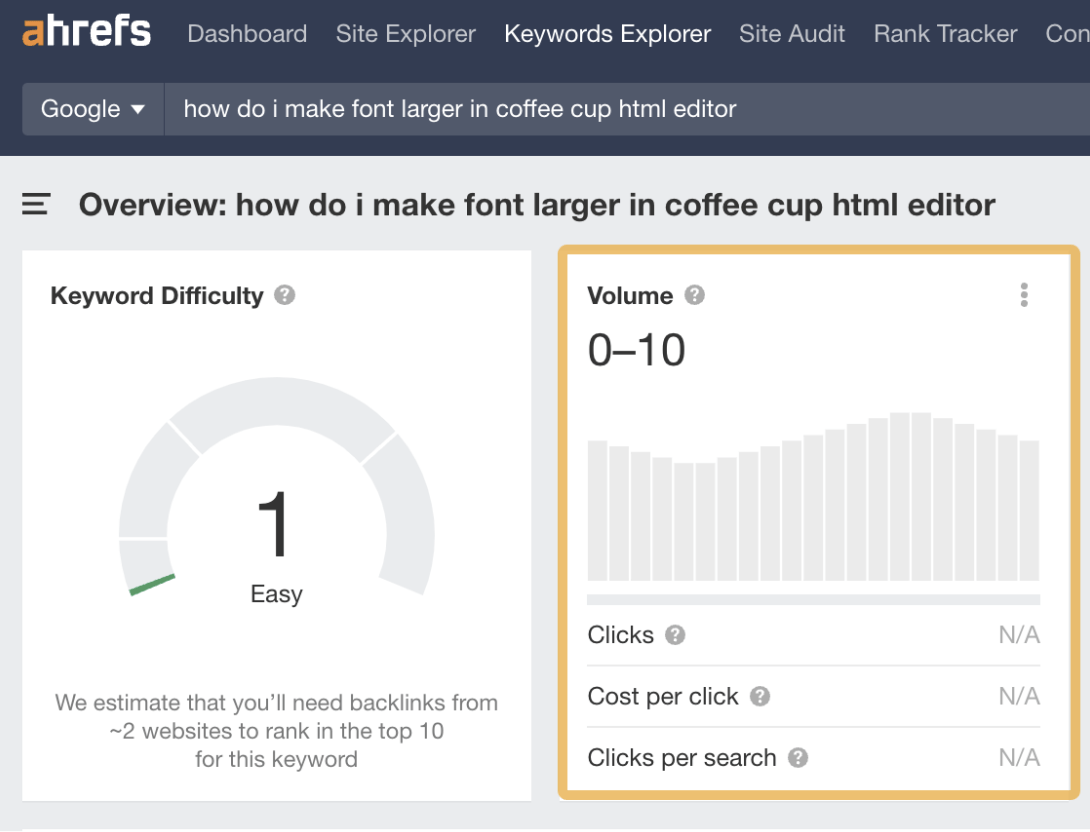
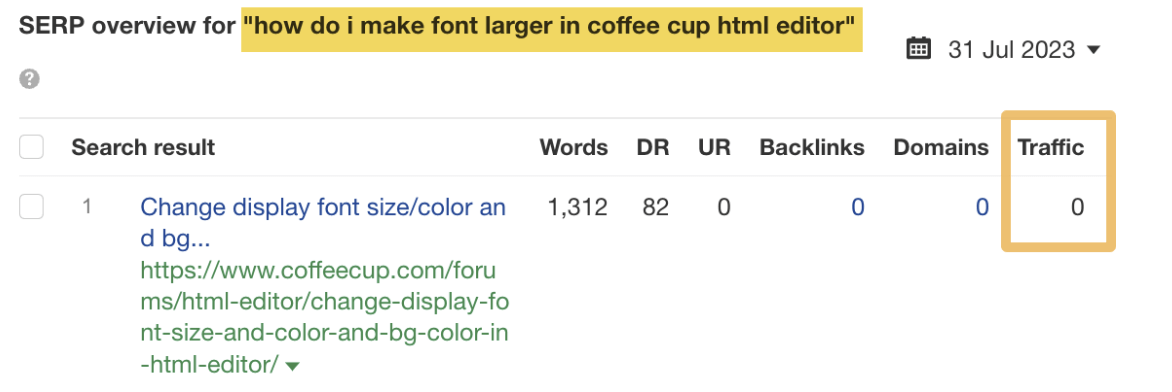
And the top-ranking page gets zero organic traffic:
To find topics people are searching for, you need a keyword research tool like Ahrefs’ Keywords Explorer. Enter a broad topic as your “seed” keyword and go to the Matching terms report.
For example, if you have a coffee-related website, you may enter “coffee” as your seed:
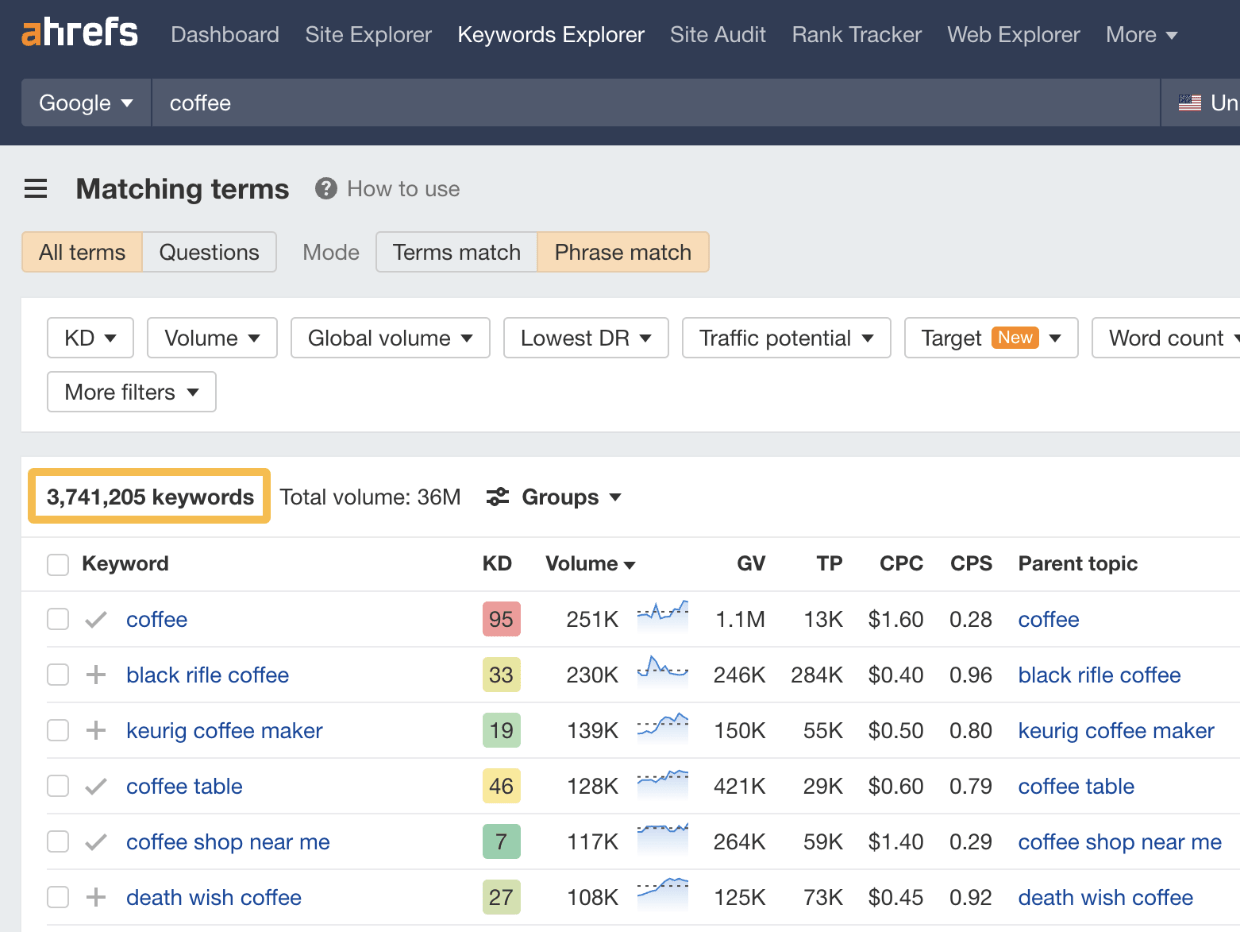
You’ll notice that the keyword ideas are sorted by their estimated monthly search volumes, so it’s easy to find the ones people are searching for. That said, there are a lot of ideas here (over 3.7M), and not all will make sense for your site.
For example, there’s no point in trying to rank for “coffee cake recipe” with a coffee affiliate site, as there’s no way to monetize the content. It doesn’t matter that it gets an estimated 60K monthly searches:

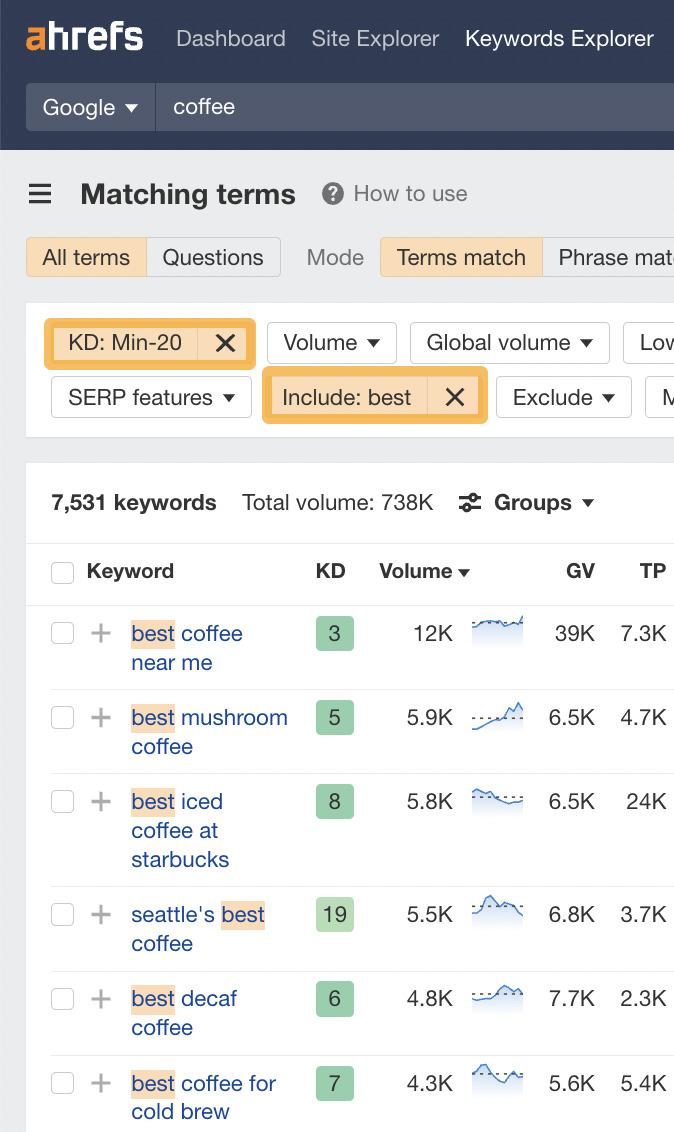
This is where the filters come in handy. If you wanted to find classic “best [whatever]” affiliate keywords, you could just add the word “best” to the Include filter:
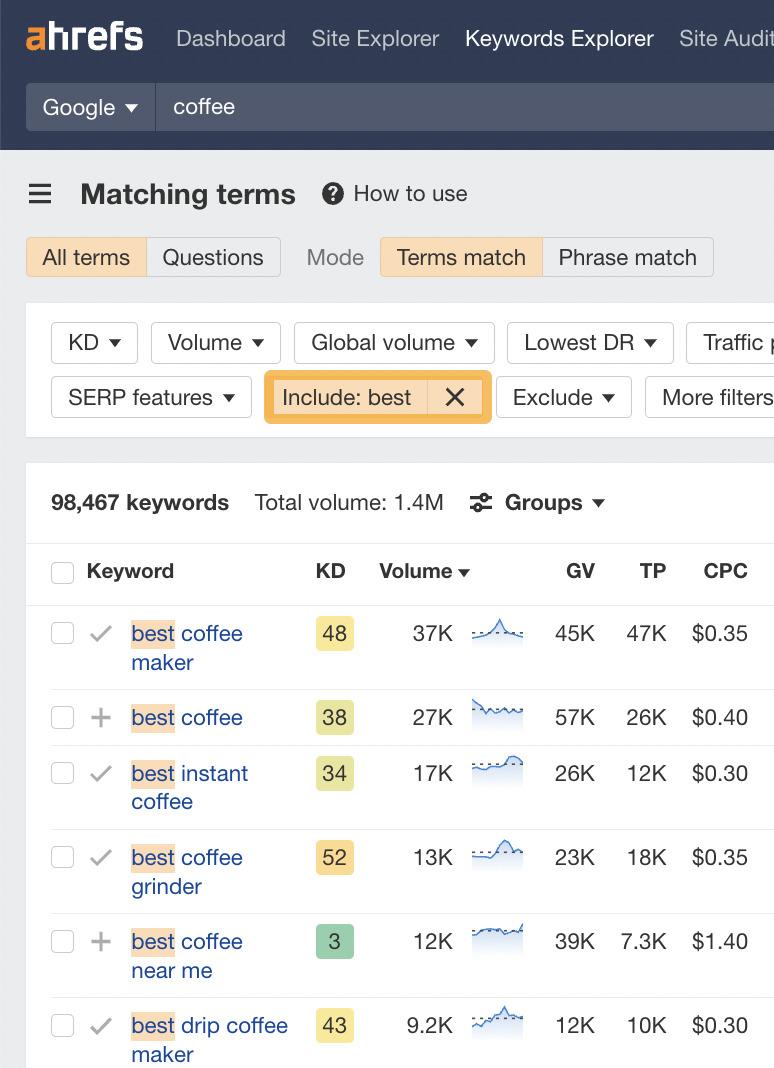
You could then filter for keywords with low Keyword Difficulty (KD) scores to hone in on easy-to-rank-for keywords:
Basically, relevant keywords with Traffic Potential that you can actually rank for are what you’re looking for. Here’s how to find them in bulk:
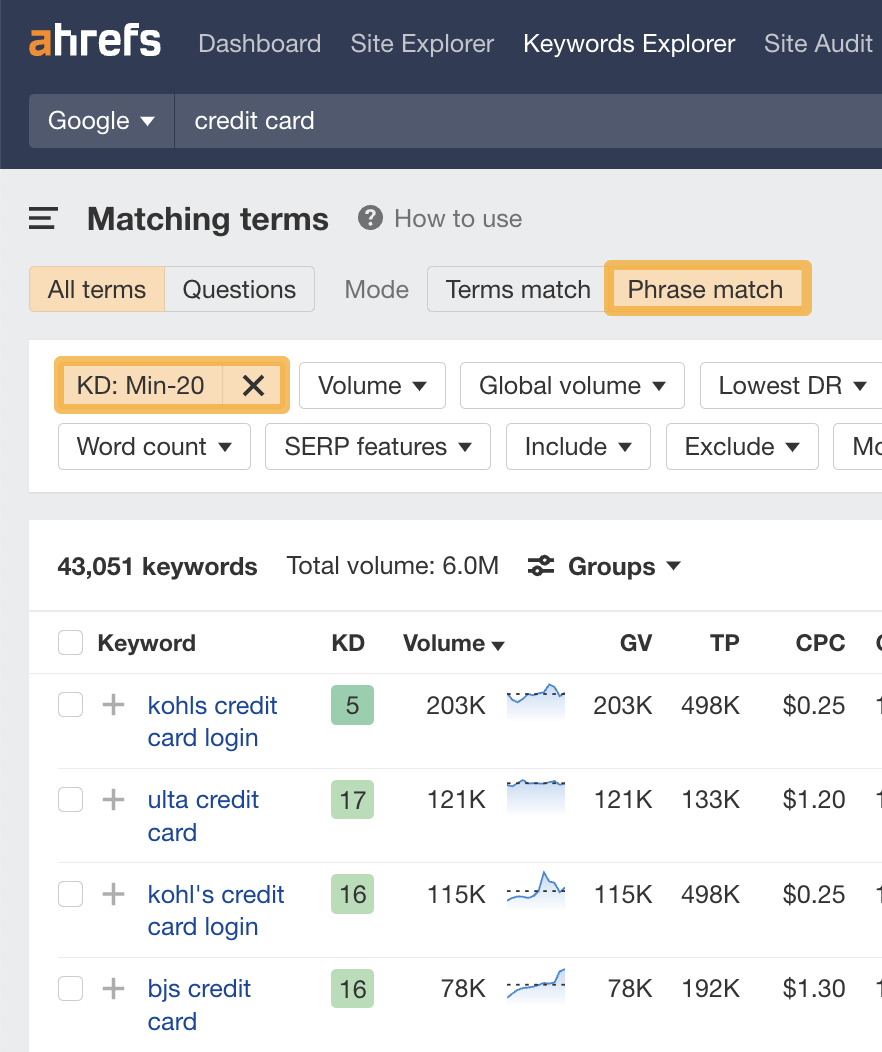
- Enter a broad topic into Keywords Explorer’s search bar
- Head to the Matching terms report
- Select Phrase match on the toggle
- Filter for keywords with a Keyword Difficulty score under 20
You can also validate the visibility potential in AI responses using Brand Radar.
Search volume tells you how many people are searching Google, but it doesn’t tell you whether AI tools are already answering those queries, or whether there’s an opportunity to be cited in them.
To check AI traffic potential for a topic, enter your topic in Brand Radar and check out the AI Responses report to see how often AI platforms like ChatGPT, Perplexity, and Google’s AI Overviews are responding to queries in that space:
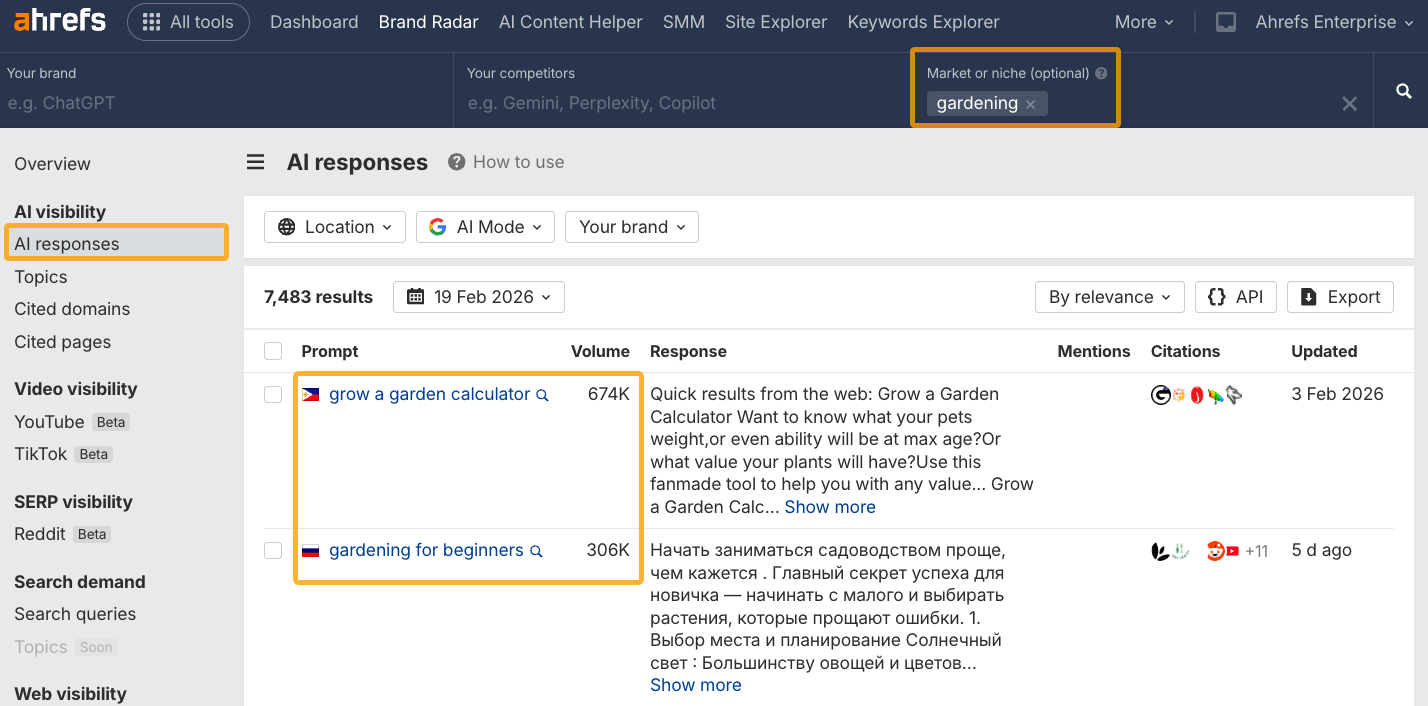
This gives you a directional sense of whether a topic has AI visibility potential and is useful for prioritizing content that can earn both traditional rankings and AI citations.
Search intent is the underlying reason for a user’s search. It’s important because Google’s main job is to provide the best results for its users’ queries. The same logic applies to AI tools like ChatGPT and Perplexity.
If your content doesn’t match what someone is actually looking for, it won’t rank or get cited, regardless of how well-optimised it is.
You’ll stand the best chance of ranking if you align your page with searchers’ intent.
For example, look at the search results for “how to make a protein shake.”
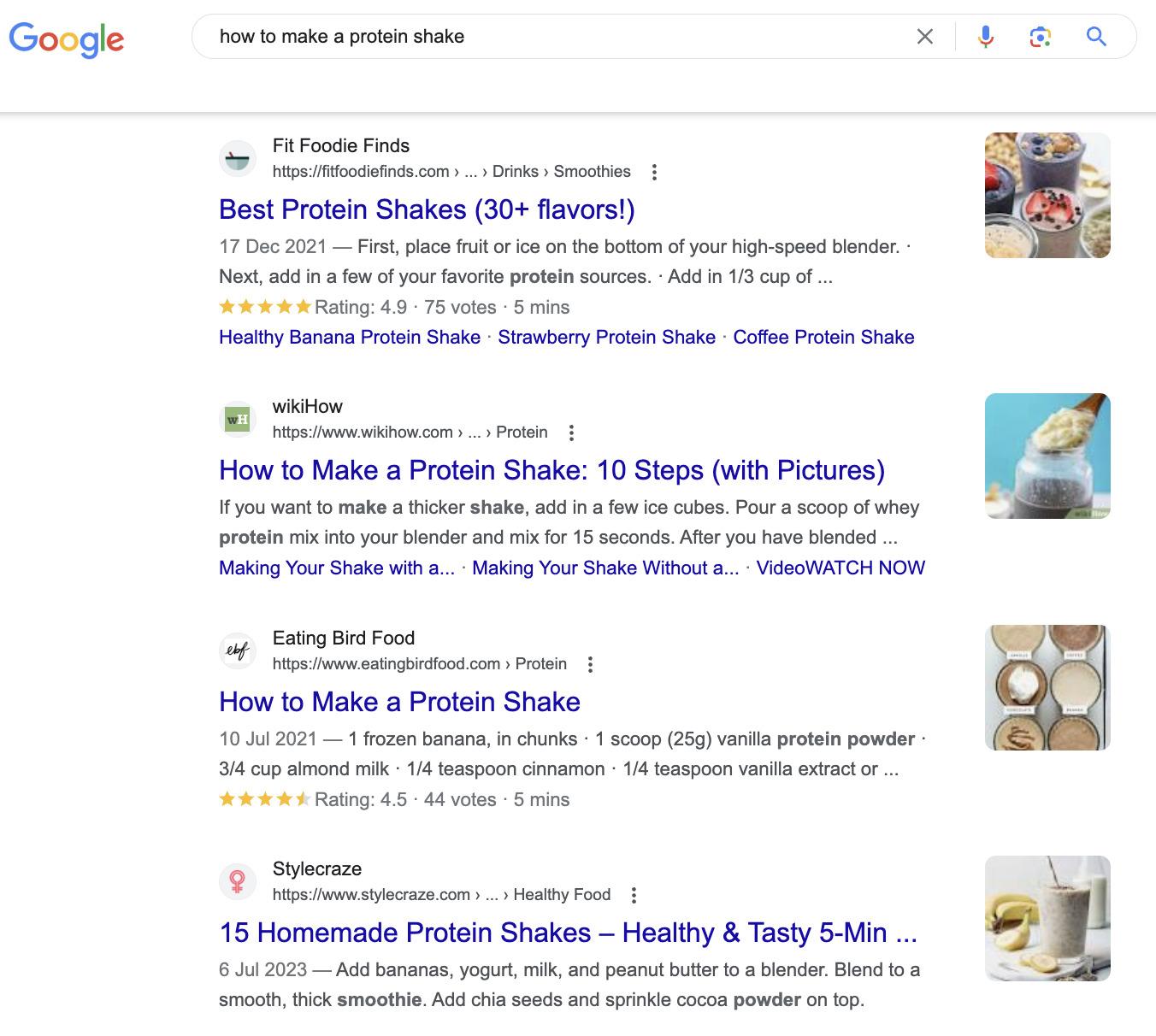
There are no products to purchase in this search result. That’s because searchers are looking to learn, not to buy.
The opposite is true for a query like “buy protein powder.”
People aren’t looking for a protein shake recipe; they want to buy some powder. This is why most of the top 10 results are ecommerce category pages, not blog posts.
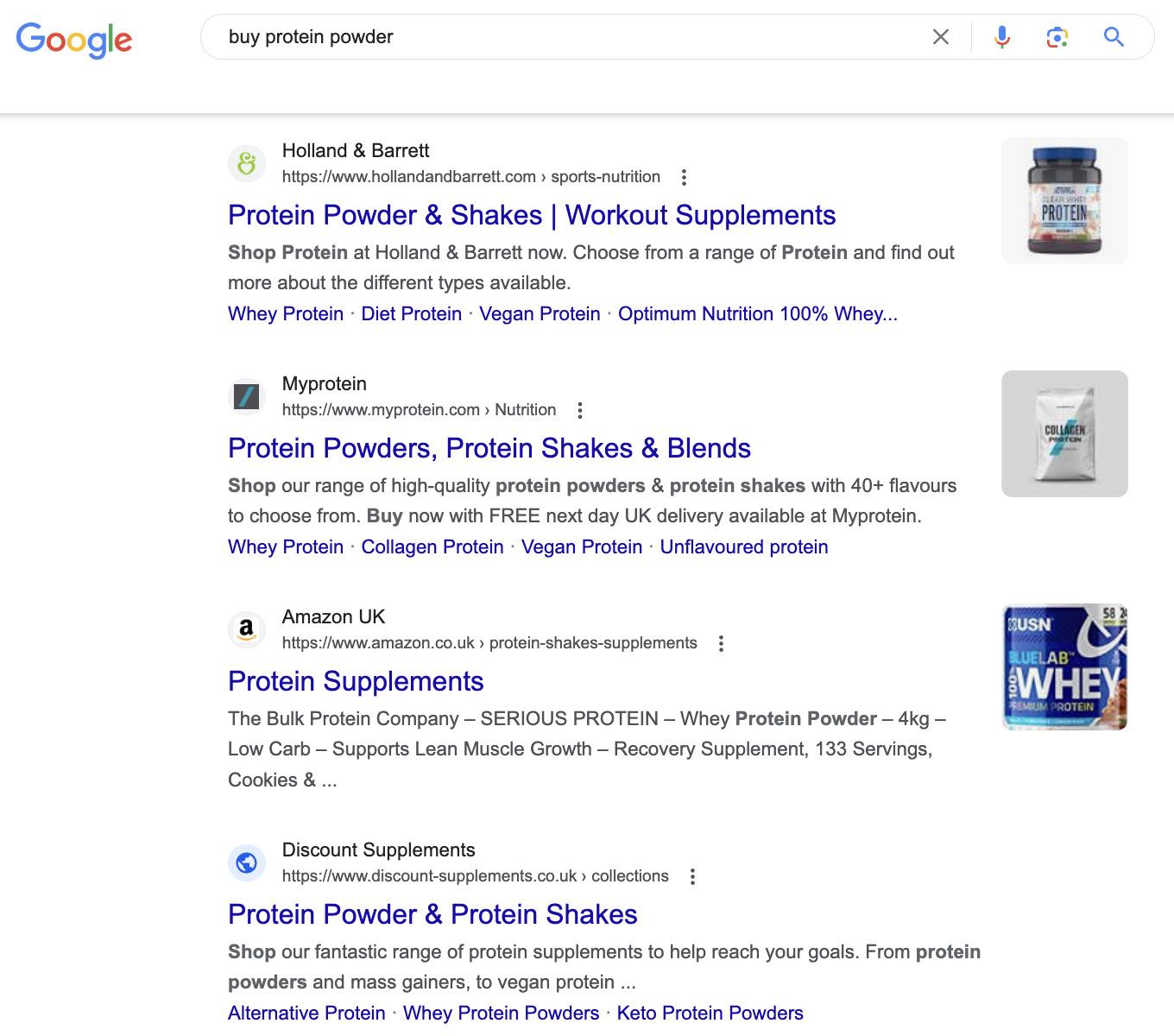
Looking at Google’s top results like this can tell you a lot about the intent behind a query, which helps you understand what kind of content to create if you want to rank.
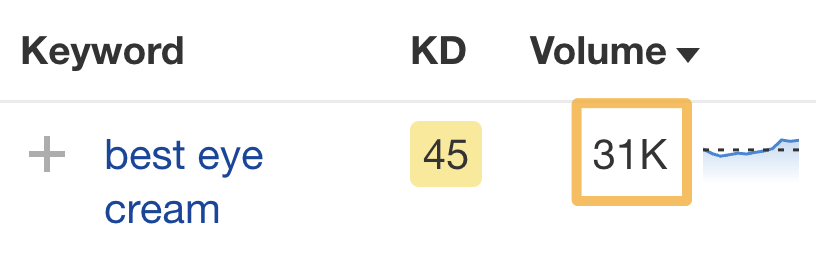
Let’s look at a less obvious keyword like “best eye cream,” which gets an estimated 31K monthly searches in the U.S.
For an eye cream retailer, it may seem perfectly logical to try to rank a product page for this keyword. However, the search results tell a different story:
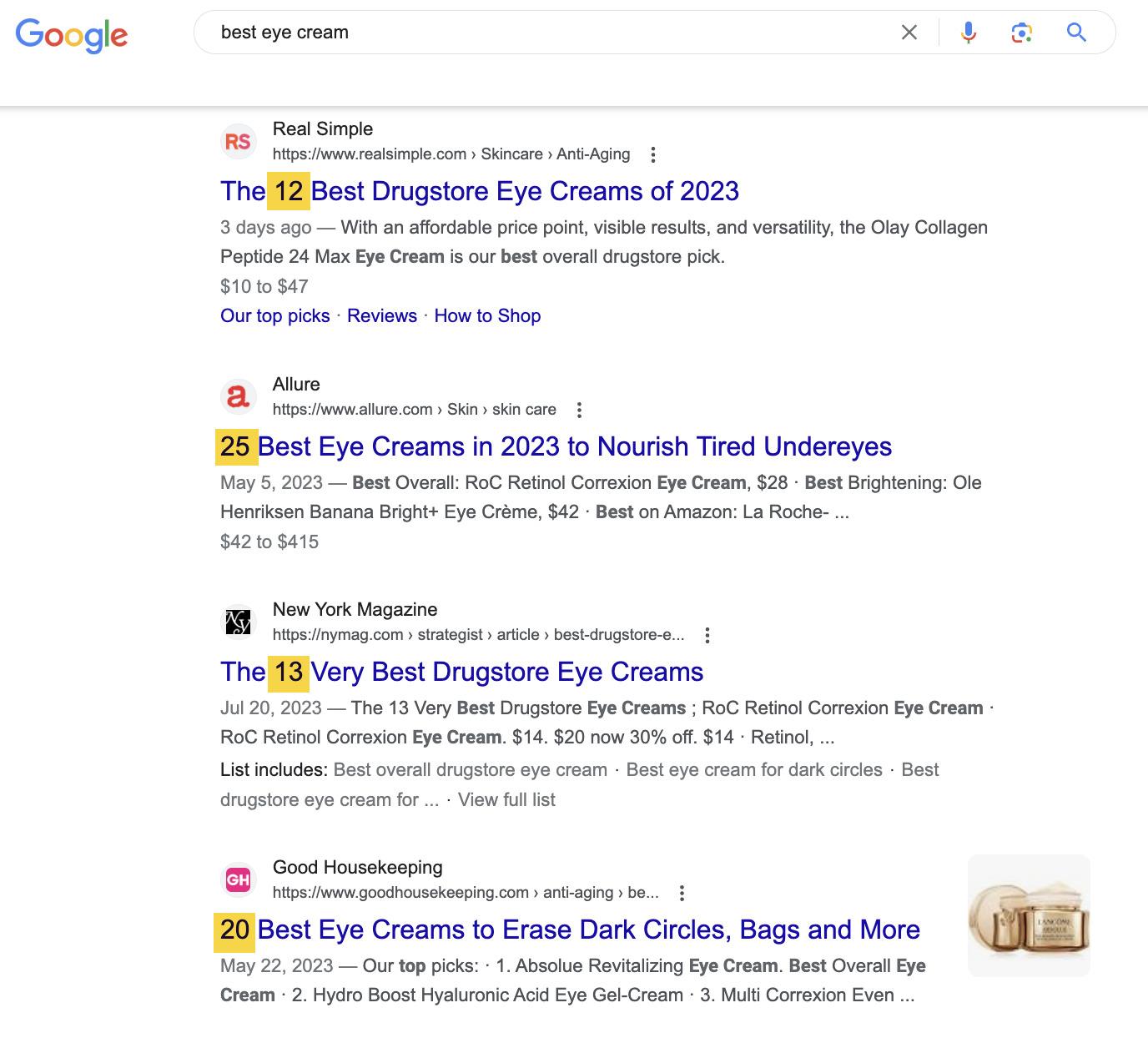
Almost all of the search results are blog posts listing top recommendations, not product pages. To stand any chance of ranking for this keyword, you should follow suit.
Catering to search intent goes way beyond creating a certain type of content. You also need to consider the content format and angle. And for AI search in particular, content that directly and clearly answers the query is more likely to be cited than content that buries the answer.
Learn more in our guide to optimising for search intent.
As AI tools like ChatGPT, Perplexity, and Google’s AI Overviews become more common entry points for search, being “found” online increasingly means being cited by these systems.
What makes content useful for AI tools is largely the same as what makes it rank well in Google: clarity, accuracy, and genuine depth.
A few specific things are worth focusing on:
- Structure your content clearly. Use descriptive headings, short paragraphs, and direct answers. If a section answers a specific question, consider making that question the heading. AI systems extract information more reliably from well-structured content.
- Answer questions directly. Lead with the answer, then provide supporting detail. Content that buries the answer is less likely to be cited in AI Overviews or chatbot responses.
- Keep content fresh with substantive updates. Stale content gets deprioritised in both traditional and AI search. Republish content by revising outdated information, adding new sections, and removing what’s no longer relevant. Just changing the date without editing the content won’t fool anyone.
It’s worth checking out Ahrefs’ AI Content Helper for this entire process.
It helps you identify content angles and topic ideas, analyzes what subtopics top-ranking pages cover, and flags gaps in your own content, all in one place. You can also bake in your brand’s style and positioning via the Brand Kit feature.
A target keyword is the main keyword that describes the focus or topic of your page. You should use this keyword in three key places:
A. Title tag
Google says to write title tags that accurately describe the page’s content. If you’re targeting a specific keyword or phrase, this should do precisely that.
It also demonstrates to searchers that your page offers what they want, as it aligns with their query.
Is this a hugely important ranking factor? Probably not, but it’s still worth including. That’s why we do it with almost all our blog posts:
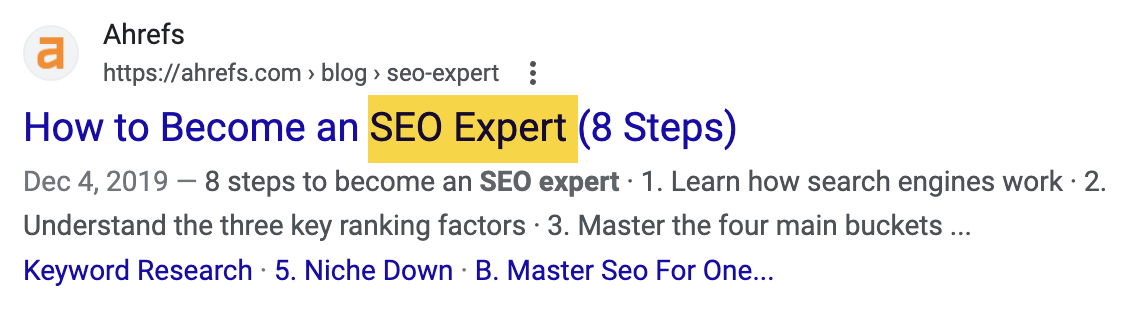
Just don’t shoehorn the keyword in if it doesn’t make sense. Readability always comes first.
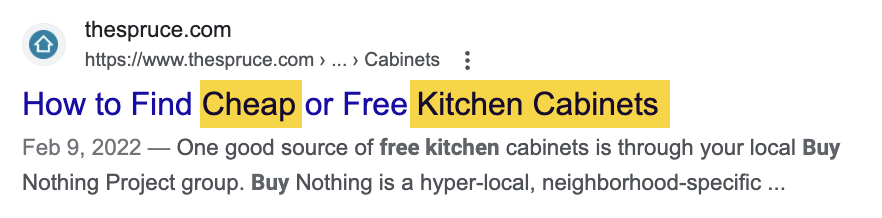
For example, if your target keyword is “kitchen cabinets cheap,” that doesn’t make sense as a title tag.
Don’t be afraid to rearrange things or add in stop words so it makes sense—Google is smart enough to understand what you mean.
B. Heading (H1)
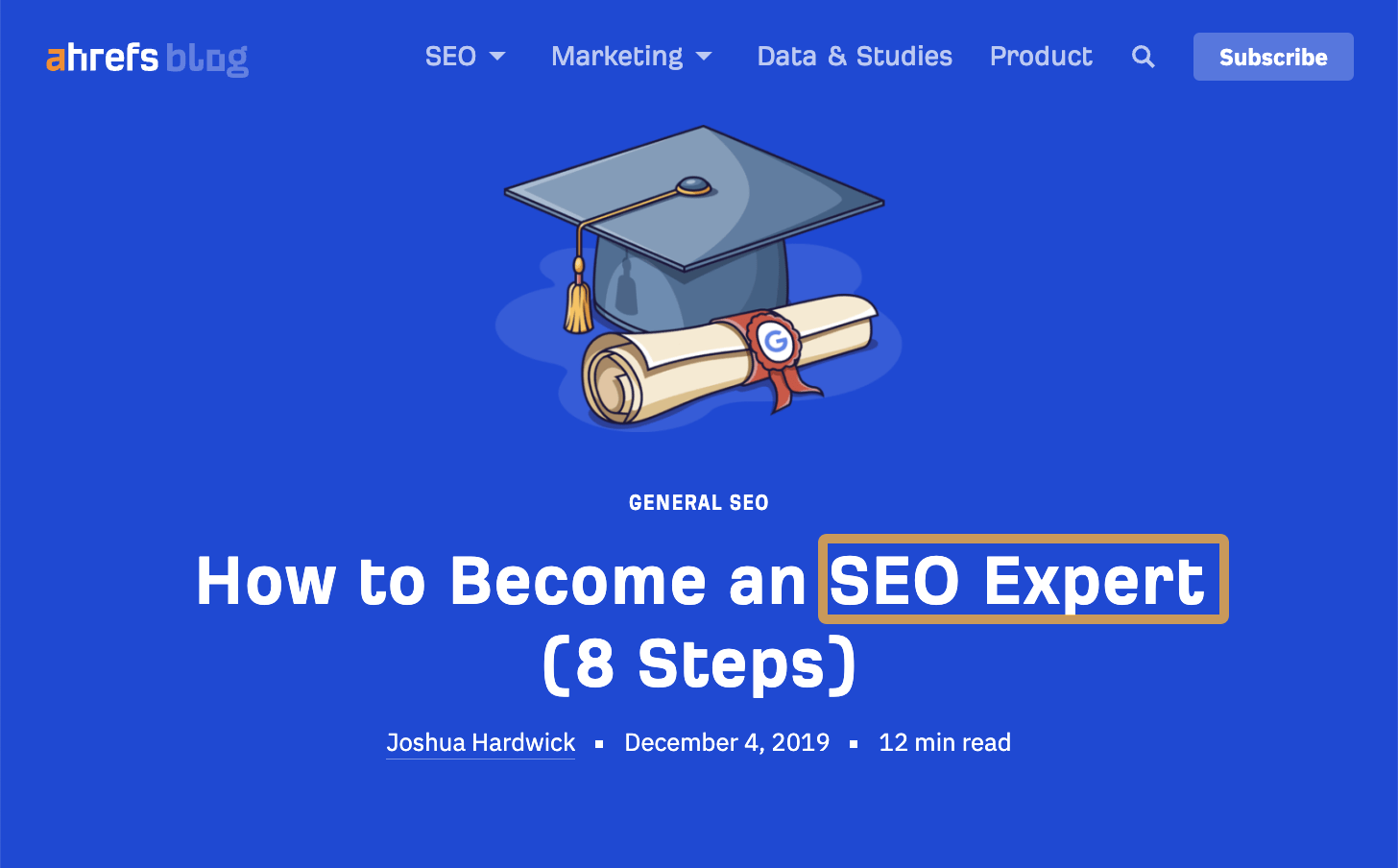
Every page should be wrapped in an H1 tag and include your target keyword where it makes sense.
C. URL
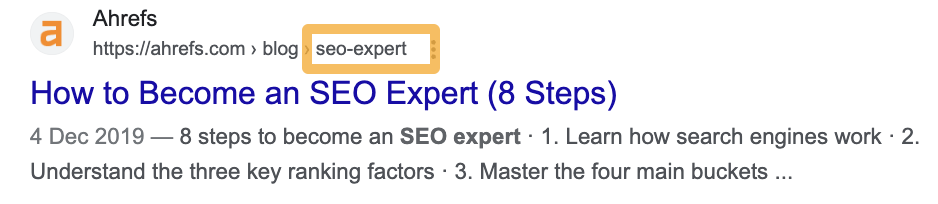
Google says to use words in URLs relevant to your page’s content.
Unless the keyword you’re targeting is unusually long, using that as the slug is the best way to do this.
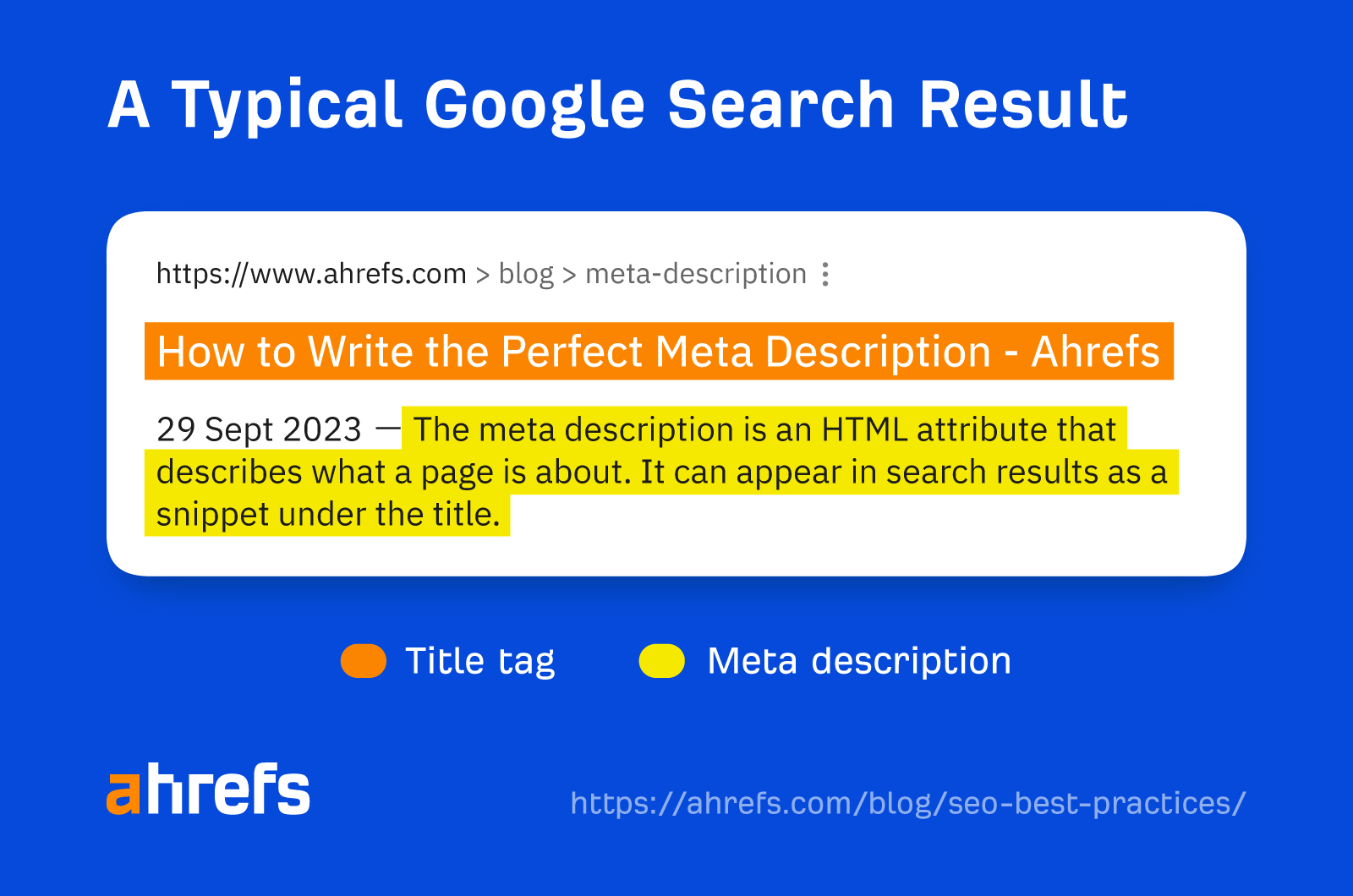
Your title tags and meta descriptions act as your virtual shop front on Google’s search results.
They usually look like this:
Users will be less likely to click on your search result if they’re unenticing.
How can you improve your click-through rate (CTR)?
First, keep your title tag under 60 characters and your descriptions under 150 characters. This helps to avoid truncation.
Second, align your title and description with the search intent.
For instance, almost all of the “best headphones” results specify the year in their titles and descriptions.
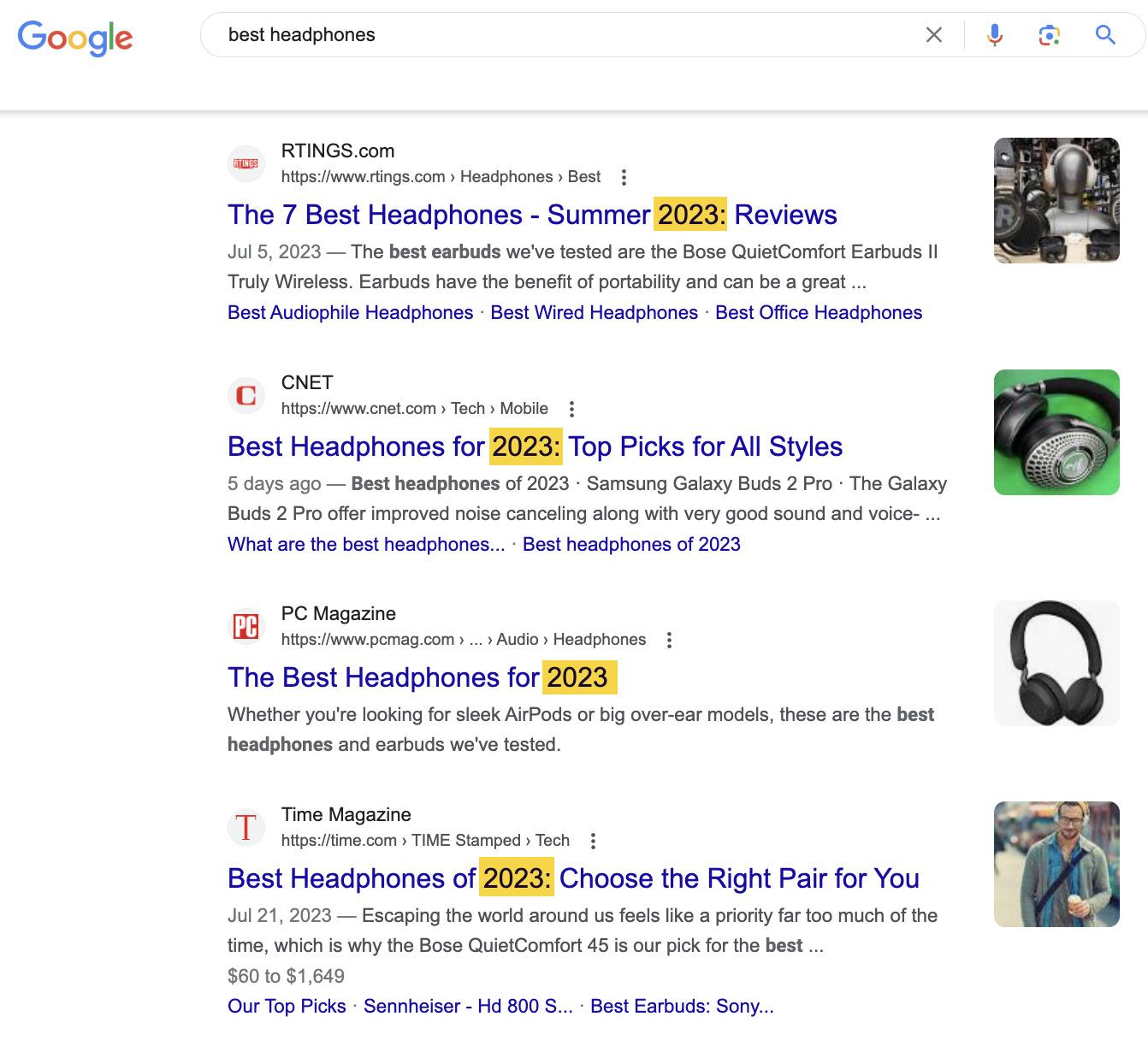
This is because people want lists of up-to-date recommendations, as new headphones are constantly released.
Third, use power words to entice the click—without being “clickbaity.”
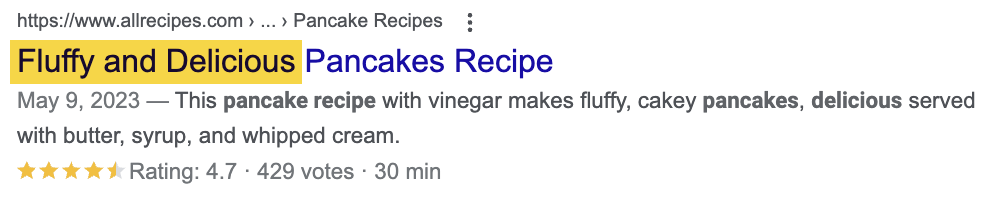
Read more about how to craft the perfect title tag, or watch this video:
URLs in SEO play a crucial role in informing users and search engines about the content and structure of a webpage.
Google says to avoid using long URLs because they may intimidate searchers.
Therefore, using the exact target query as the URL isn’t always the best practice.
Just imagine your target keyword is “how to get rid of a tooth abscess without going to the dentist.” Not only is that a mouthful (no pun intended), but it’s also going to get truncated in the search results:

Removing stop words and unnecessary details will give you something shorter and sweeter while keeping the important words.
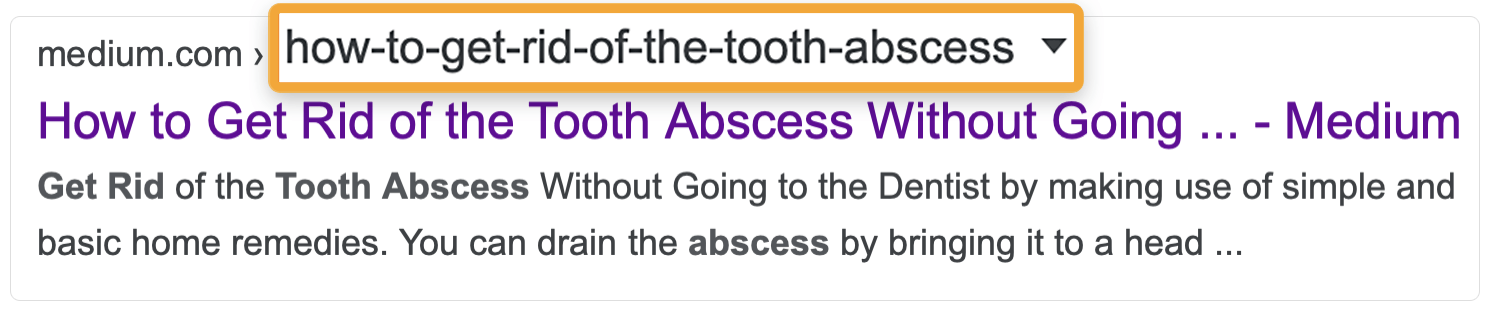
That said, don’t be afraid to describe your page more succinctly where needed.

Note that if your CMS already has a predefined, ugly URL structure, it’s not a huge deal. And it’s certainly not worth jumping through countless hoops to fix.
Image optimization for SEO is the process of ensuring your images are optimized for search.
It’s important to optimize images because they can show up in Google Images and drive additional search traffic to your site.
https://twitter.com/JohnMu/status/1036901608880254976
Don’t overlook the importance of Google Images. It’s sent us over 5.5K clicks in the past three months:
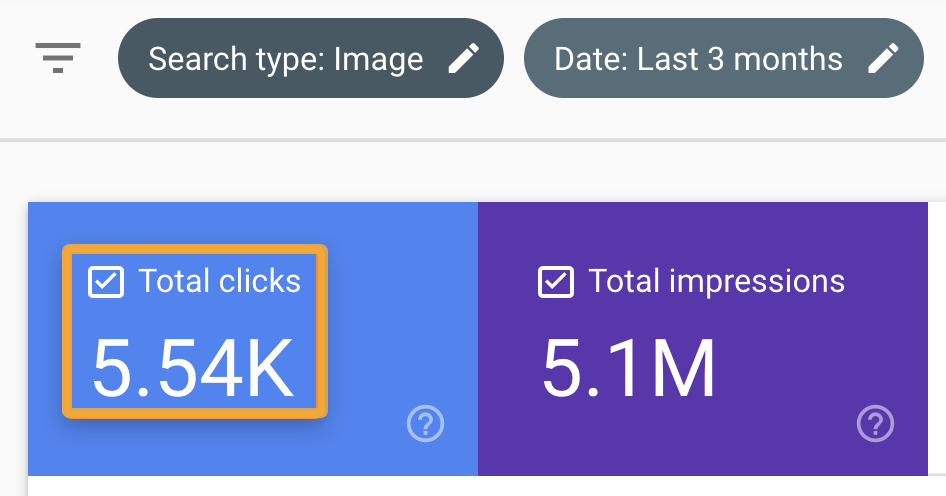
Optimizing file names is simple. Just describe your image in words and separate those words with hyphens.
Here’s an example:

Filename: number-one-handsome-man.jpg
For alt tags, do the same—but use spaces, not hyphens.
<img src=”…/number-one-handsome-man.jpg” alt=“the world’s most handsome man”>
Alt text isn’t only important for Google but also for visitors.
If an image fails to load, the browser shows the alt tag to explain what the image should have been:
Plus, around 8.1M Americans have vision impairments and may use a screen reader. These devices read alt tags out loud.
Internal links are links from one page to another within your website. They’re used for internal navigation, allowing visitors to move from A to B.
They’re important because they have a special role in SEO. Generally speaking, the more links a page has—from external and internal sources—the higher its PageRank. This is the foundation of Google’s ranking algorithm and remains important today.
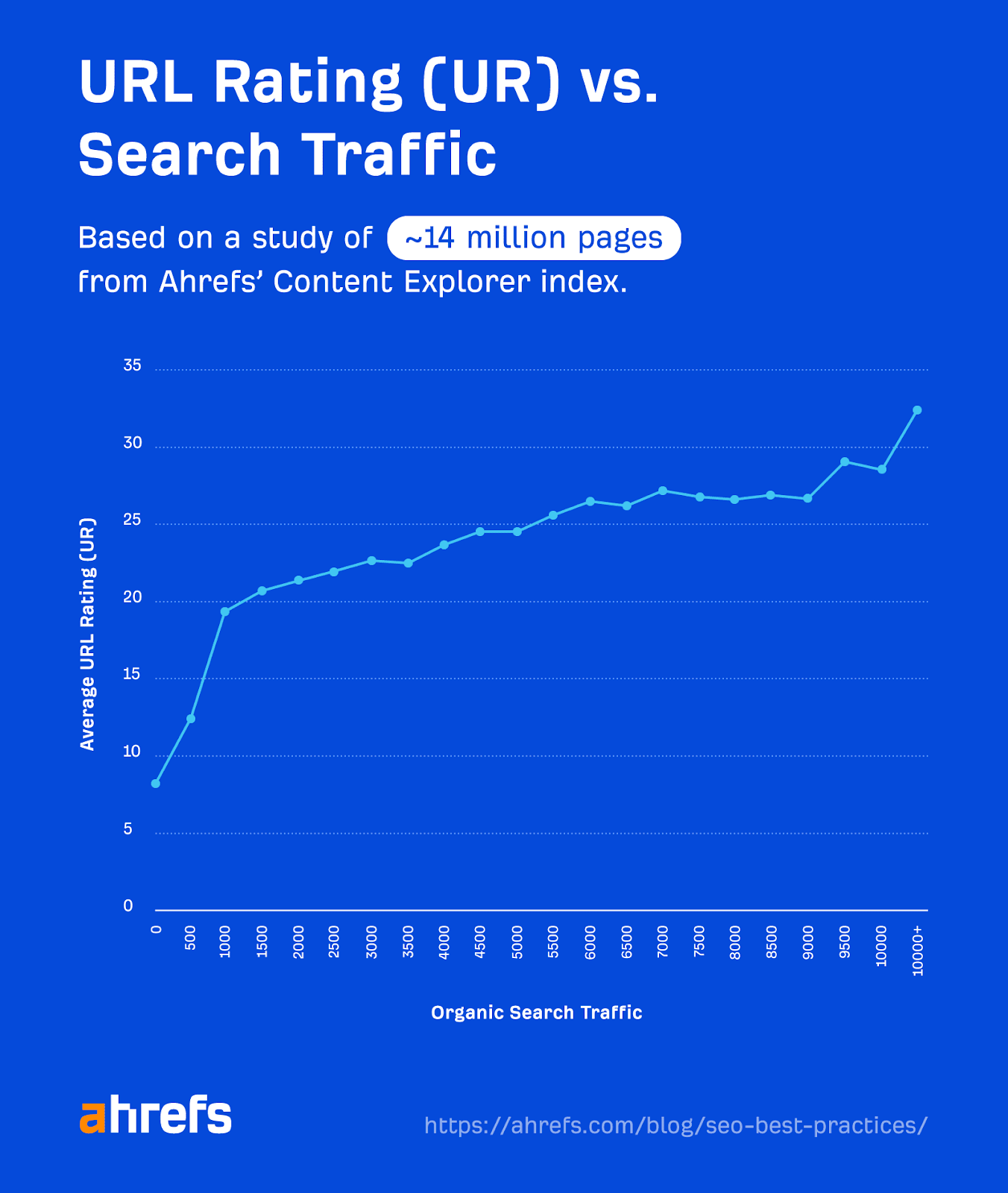
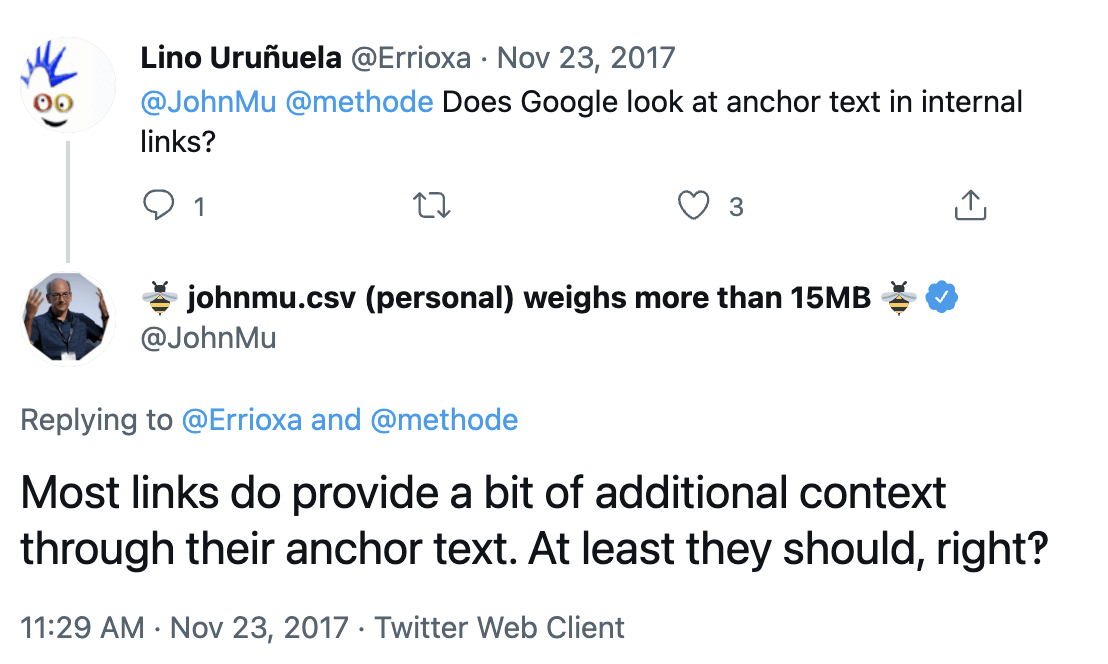
Internal links also help Google understand what a page is about.
Luckily, most CMSes add internal links to new webpages from at least one other page by default. This may be on the menu bar, on the blog homepage, or somewhere else.
However, it’s good practice to add internal links from other relevant pages whenever you publish something new.
To do this, search Site Audit’s Page Explorer for the topic you are searching for. In this example, I’ve entered the keyword “lsi” into the search box and set the dropdown to “Page text.”
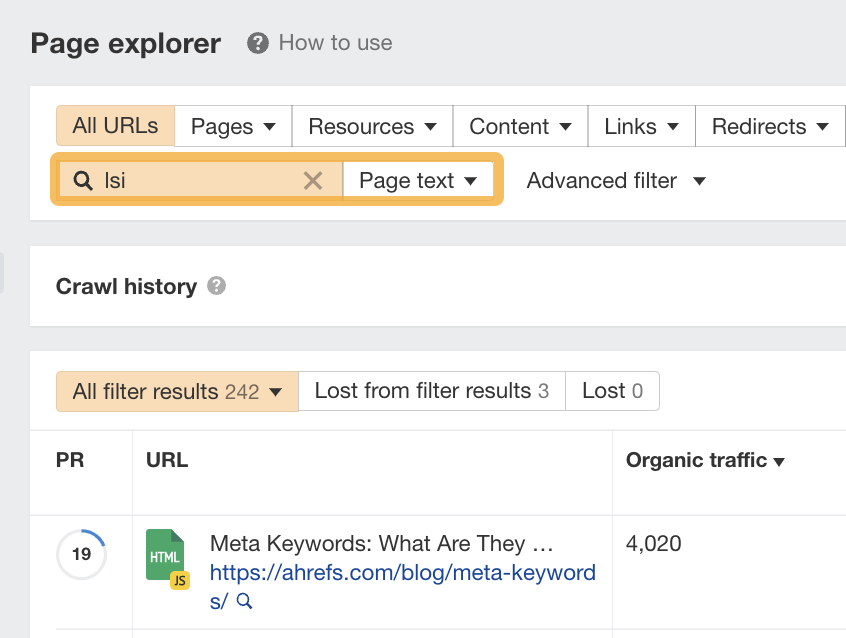
This will find mentions of a keyword or topic on your site in the same way that a Google site: search would do. These are relevant places to add internal links.
Google and AI platforms want to surface the best content for searchers, and that’s the content that covers everything they want to know.
Here are a couple of ways to find out what those things might be:
A. Look for common subtopics on the top-ranking pages
You can identify common subtopics by opening two or three top-ranking pages, opening up Ahrefs’ SEO Toolbar, and clicking on the “Content” tab.
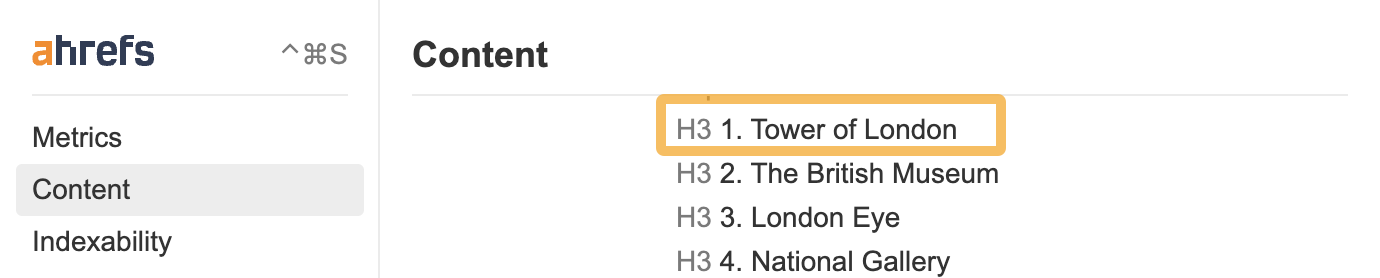
I’ve run a search for “things to do in london,” and I can see that both the Tripadvisor page and Lonely Planet page mention the Tower of London as the top attraction to visit.
Here’s the content structure of the Tripadvisor page:
And here’s the same for the Lonely Planet page:
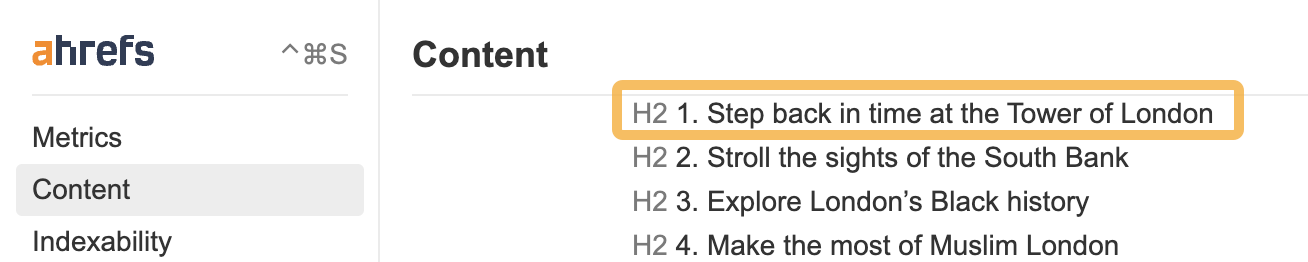
We can see that the common subtopic between the two is the “Tower of London.”
This is likely something searchers expect and want to see on a list of things to do in London because multiple top-ranking pages talk about it.
B. Run a content gap analysis
You can run a content gap analysis if you want to take things further.
To do this, paste the URLs of the three top-ranking pages into Ahrefs’ Content Gap tool. Leave the bottom field blank and hit “Show keywords.”
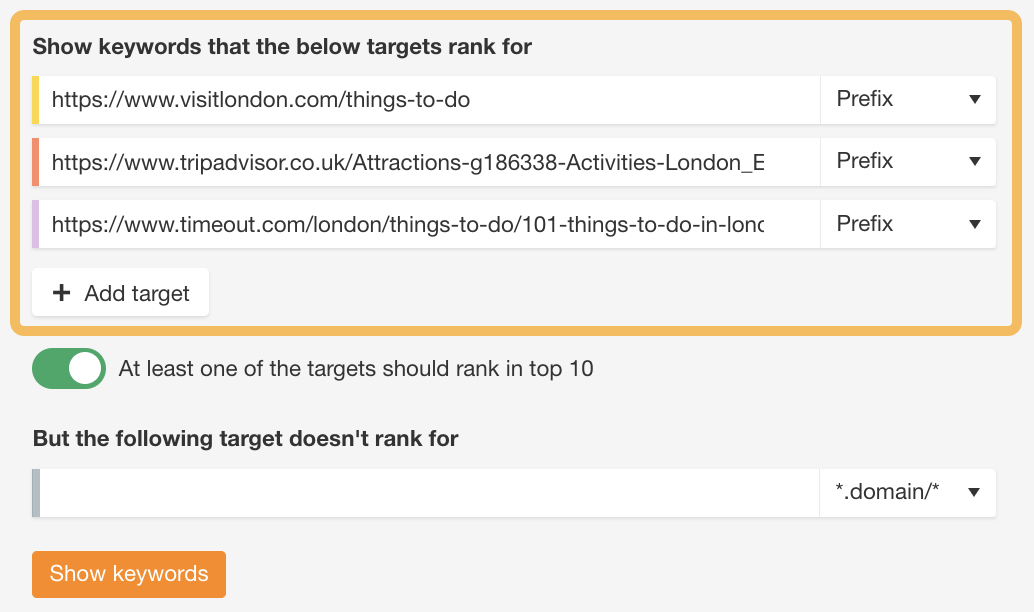
Then, if you set the competitor filter to at least 2 competitors, this shows queries that at least two of the targets rank for. These are probably important subtopics if more than one page is already ranking for them.
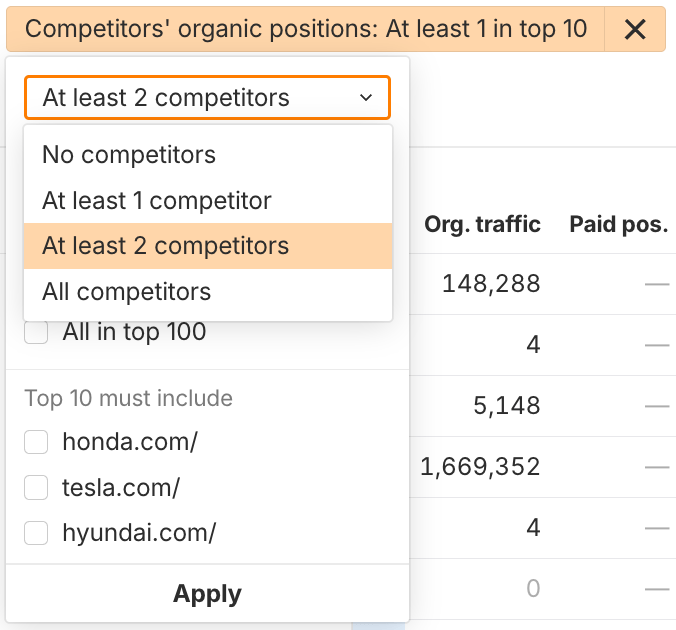
There are 222 interesting variations here of “things to do in london,” such as “things to see in london,” “what to see in london,” and “must see in london.”
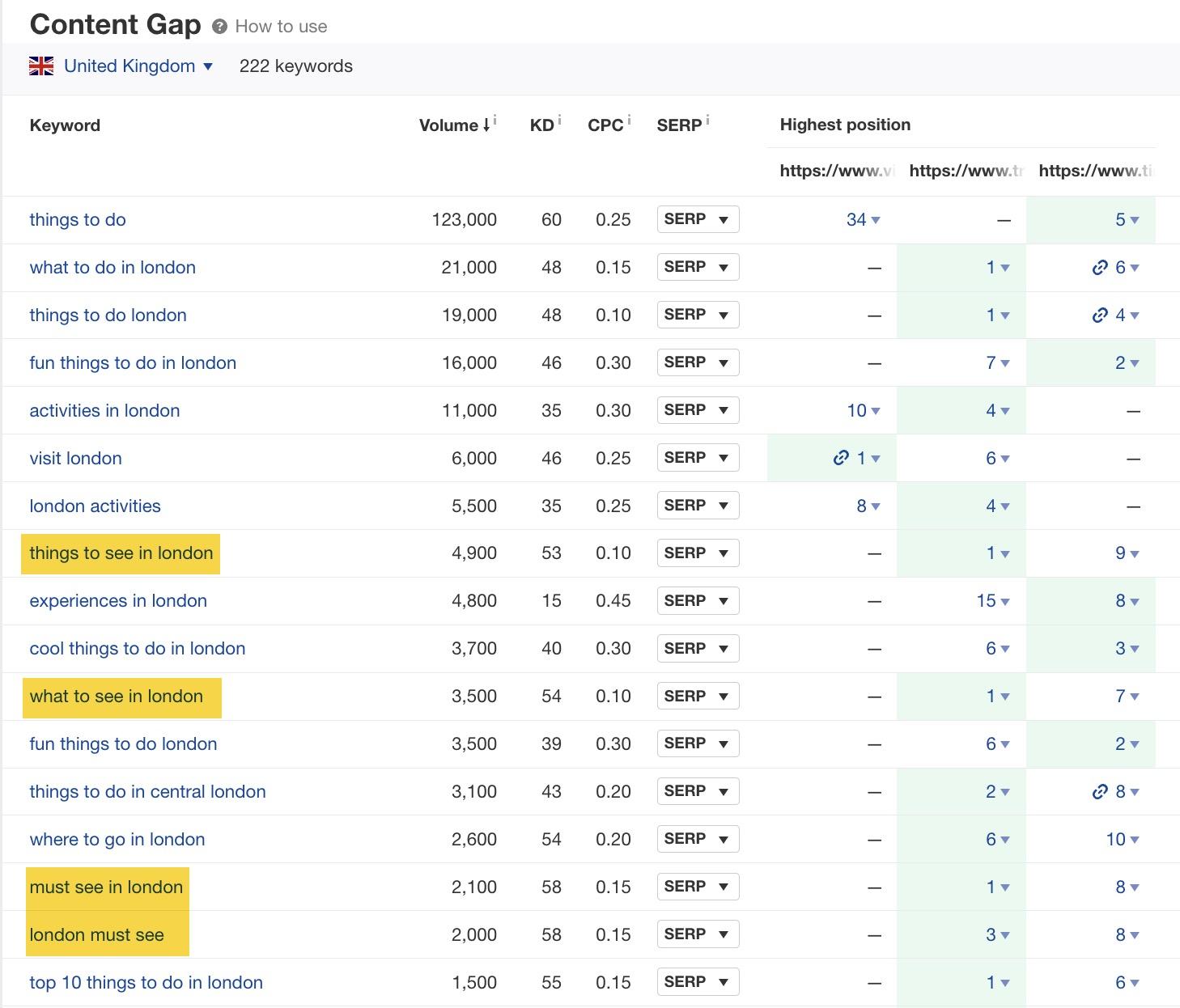
This shows that sightseeing is one of the things searchers are interested in doing in London, and they want recommendations.
These are just a few subtopics you can cover to make your content more thorough.
Backlinks are links from other websites to yours, and they act as votes of confidence in your brand or content. They remain one of the most important Google ranking factors. Google’s “How Search Works” page confirms that links from prominent websites on a subject are a strong signal of quality.
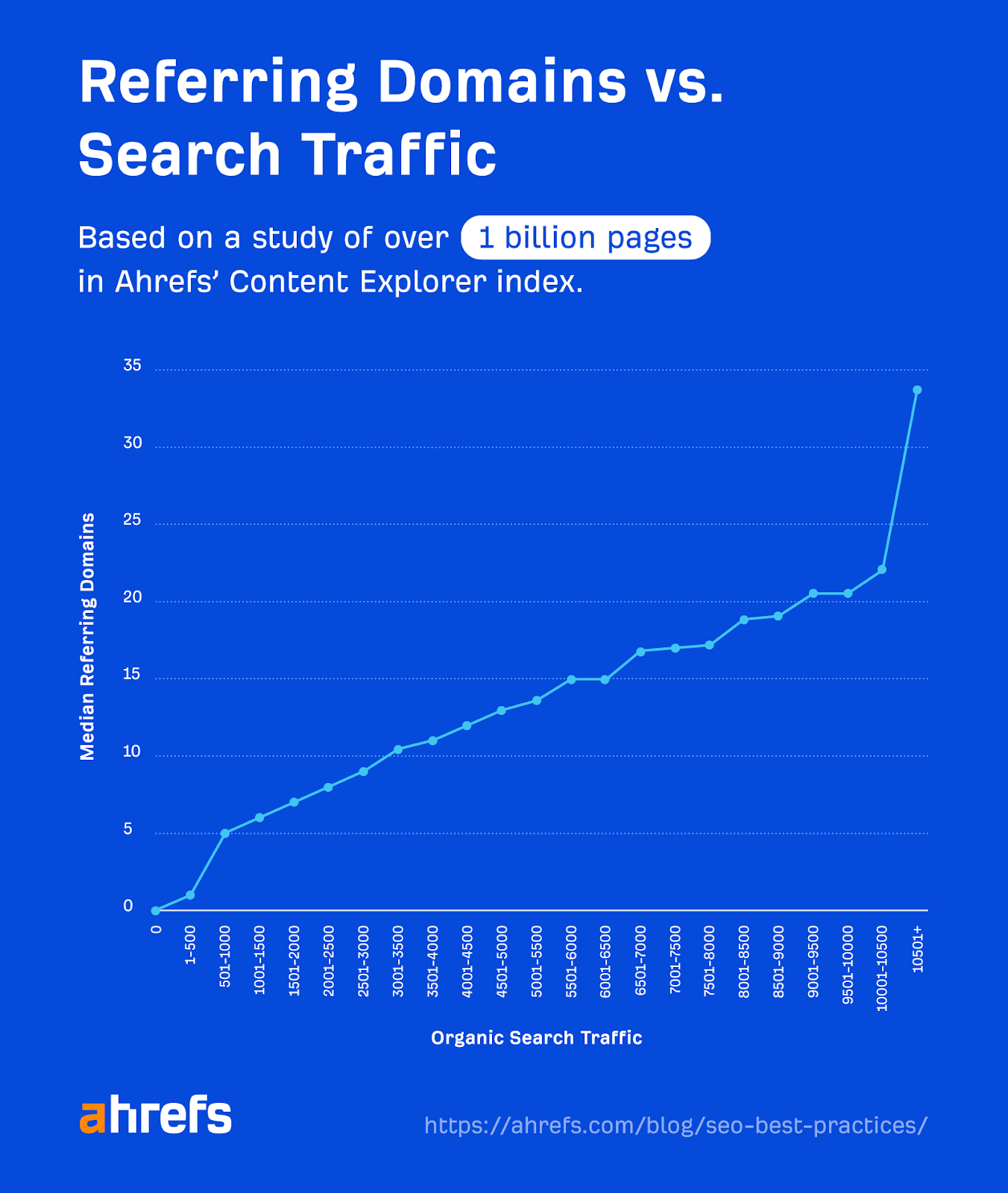
Our study of over 1 billion webpages also shows a clear correlation between organic traffic and the number of websites linking to a page.
But sometimes you can get mentioned on a website without a link. In traditional SEO, these mentions did not directly impact rankings and SEO performance.
Now that AI is deeply integrated into most search platforms, this is no longer an issue. Brand mentions (with or without a link back to your site) can influence visibility in search results, especially AI responses.
AI tools like ChatGPT and Perplexity build their understanding of your brand from everything written about you across the web including:
- Links
- Mentions
- Citations
- References on reputable sites
Just remember that this is about quality, not just quantity. You should aim to build backlinks and positive mentions from authoritative and relevant websites.
Core Web Vitals are website performance metrics introduced by Google to measure and evaluate user experience.
These are the core metrics that you should benchmark against:
- Largest Contentful Paint (LCP): How long it takes for the page’s main content to load. Aim for under 2.5 seconds.
- Interaction to Next Paint (INP): How quickly the page responds to user interactions, like clicks, taps, and keyboard inputs. Aim for under 200 milliseconds.
- Cumulative Layout Shift (CLS): How much the page layout shifts unexpectedly as it loads. Aim for a score under 0.1.
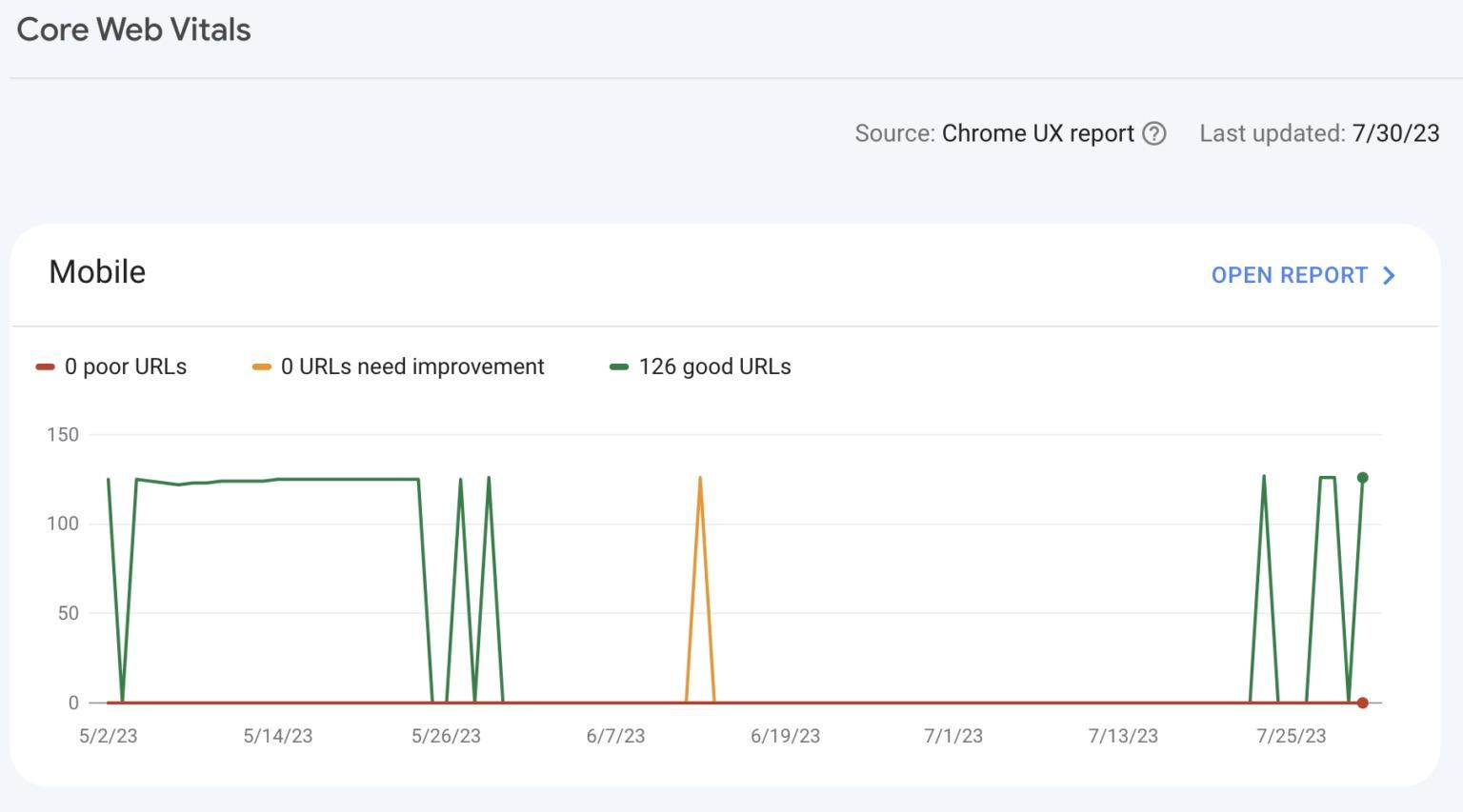
When monitoring these metrics, start by using Google Search Console’s Core Web Vitals report.
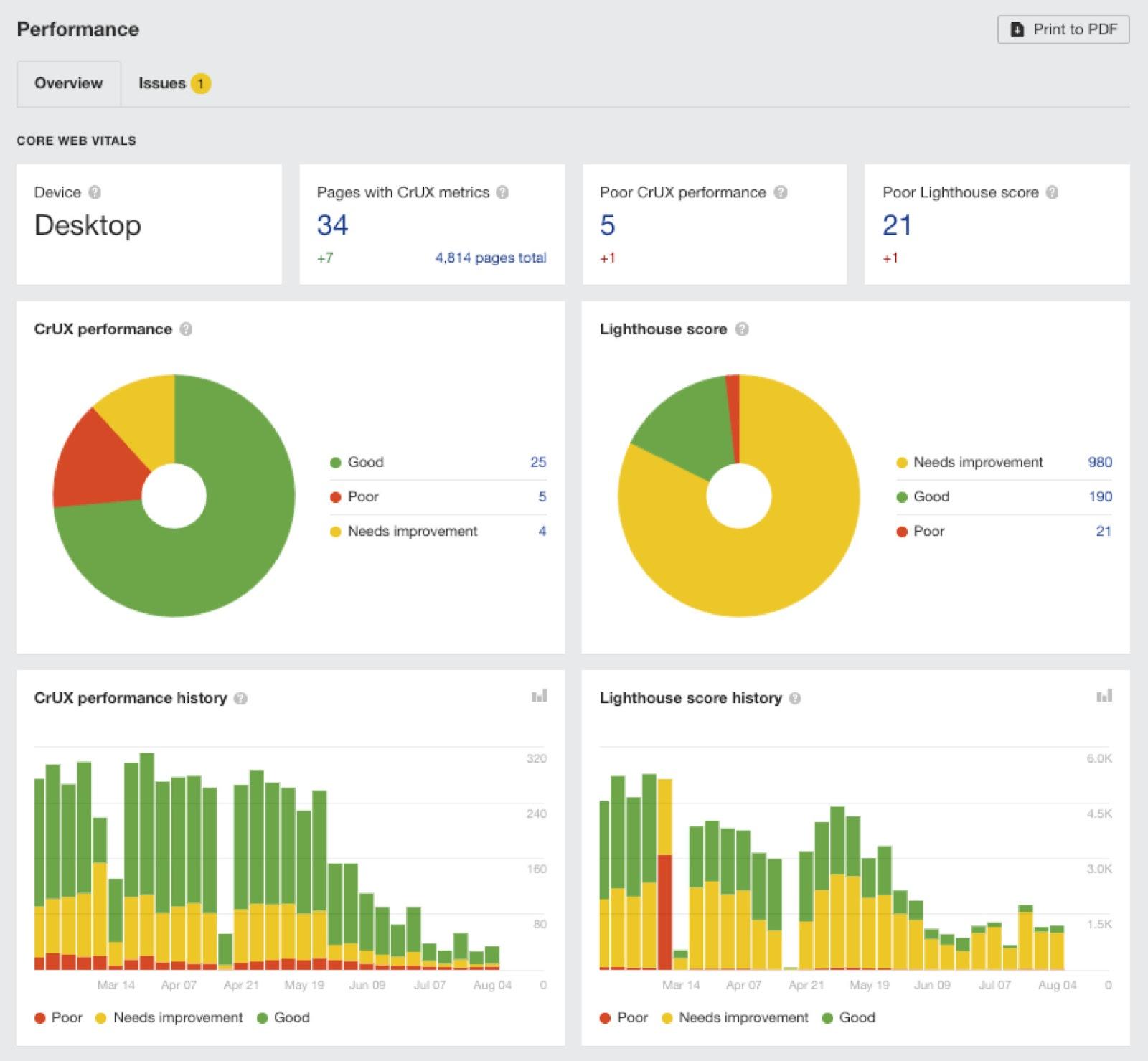
If you need more data, check out the Performance report in Ahrefs’ Site Audit.
Fixing these issues can be complicated, so your best bet is usually to ask a developer (or an SEO expert) to fix them.
Here are some general tips to help keep your pages optimized for speed and usability:
- Use a CDN – Most sites live on one server in one location. So, for some visitors, data has to travel long distances before it appears in their browsers. This is slow. CDNs solve this by copying critical resources like images to a network of servers around the globe so that resources are always loaded locally.
- Compress images – Image files are big, which makes them load slowly. Compressing images decreases the file size, which makes them faster to load. You just need to balance size with quality.
- Use lazy-loading – Lazy-loading defers the loading of offscreen resources until you need them. This means that the browser doesn’t need to load all of the images on a page before it’s usable.
- Use an optimized theme – Choose a well-optimized website theme with efficient code. Run the theme demo through Google’s Pagespeed Insights tool to check.
HTTPS (Hypertext Transfer Protocol Secure) indicates that the site is using an SSL certificate. It means your data is encrypted as it passes from your browser to the website’s server.
It’s been a Google ranking factor since 2014, and is still important.
You can tell if your site is already using HTTPS by checking the loading bar in your browser. If there’s a “lock” icon before the URL, then you’re good.

If not, you need to install an SSL certificate.
Lots of web hosts offer these in their packages. If yours doesn’t, you can pick one up for free from Let’s Encrypt.
The good news is that switching to HTTPS is a one-time job. Once installed, every page on your site should be secure—including those you publish in the future.
Next steps
Implementing these 15 SEO best practices is a great starting point to ranking higher on Google and becoming more visible in AI responses, but you’ll need to monitor your progress, be consistent in your delivery, and, most importantly, be patient.
Results don’t always come immediately—but if you trust the process and consistently try to improve your SEO, you should see incremental results in time.